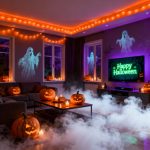

Halloween decorations have evolved far beyond traditional carved pumpkins and plastic skeletons draped across your front porch. With Americans spending a record-breaking $13.1 billion on Halloween in 2025, homeowners are looking for innovative ways to create immersive, spine-chilling experiences that leave lasting impressions on trick-or-treaters and guests. Smart home automation offers the perfect solution, transforming your ordinary home into an interactive haunted house that responds to visitors with perfectly timed scares, dynamic lighting effects, and atmospheric sounds.
The beauty of using smart home devices for Halloween lies in their year-round functionality. Unlike traditional decorations that get packed away after October 31st, these devices continue serving your home with enhanced security, convenience, and energy efficiency throughout the year. Whether you’re a seasoned home automation enthusiast or just starting your smart home journey, this comprehensive guide will walk you through everything you need to create a professional-grade haunted experience.
Why Choose Smart Home Automation for Halloween
Smart home automation elevates your Halloween display from static decorations to an interactive experience that reacts to your visitors in real-time. Traditional timer-based setups lack the spontaneity and precision that motion-triggered automations provide, often running at predetermined times regardless of whether anyone is around to appreciate them.
With 63% of US households already owning at least one smart home device in 2025, many homeowners have the basic infrastructure needed to create impressive Halloween automation without significant additional investment. The technology has become more accessible, affordable, and user-friendly than ever before, making it possible for anyone to design complex automation sequences without technical expertise.
Smart automation also solves practical problems that plague traditional Halloween setups. You can control everything remotely through smartphone apps, adjust timing and intensity on the fly, and even monitor visitor reactions through connected security cameras. Plus, the ability to pause regular security automations and implement special Halloween-specific routines means you won’t accidentally trigger false alarms or notifications during trick-or-treating hours.
Building Your Foundation: Essential Smart Home Hub Selection
The smart home hub serves as the central command center for your entire Halloween automation system, coordinating all your different devices and ensuring they work together seamlessly. Without a capable hub, your individual smart devices remain isolated, unable to communicate or create the synchronized sequences that make Halloween automation truly impressive.
Choosing the Right Hub for Your Needs
Several excellent hub options dominate the market in 2025, each with distinct advantages. The Amazon Echo Hub leads the pack as a dedicated smart home control center with an 8-inch touchscreen, built-in Alexa voice control, and support for Zigbee, Thread, and Matter protocols. For homes heavily invested in Z-Wave devices, the Hubitat Elevation offers robust local processing and comprehensive automation capabilities without relying on cloud connectivity.
The Aeotec Smart Home Hub provides exceptional versatility, supporting over 5,000 devices across multiple protocols including Z-Wave, Zigbee, Bluetooth, and Wi-Fi. This makes it ideal for homeowners who want to mix and match devices from different manufacturers without compatibility concerns. Google Nest Hub (2nd Generation) and Apple HomePod mini serve as excellent entry-level options for users already embedded in their respective ecosystems.
Key Features to Prioritize
When selecting your hub, prioritize support for multiple communication protocols to maximize device compatibility. Look for hubs offering both local and cloud processing capabilities, as local control ensures your Halloween automations continue functioning even if your internet connection drops during peak trick-or-treating hours. The ability to create complex automation rules, scenes, and conditional triggers separates basic hubs from those capable of orchestrating sophisticated Halloween sequences.
Creating Interactive Triggers: Sensors and Detection Systems
Triggers form the foundation of responsive Halloween automation, determining when and how your scary sequences activate. The right combination of sensors ensures your display reacts precisely when visitors arrive, creating perfectly timed scares rather than random activations that waste effect and drain batteries.
Motion Sensors for Responsive Automation
Motion sensors detect movement using passive infrared (PIR) technology, sending instant signals to your smart hub when someone enters their detection zone. Strategic placement makes all the difference—position sensors at your property entrance to trigger initial ambiance changes, then add secondary sensors along walkways for progressive scares as visitors approach your front door.
Many security floodlights and smart switches include built-in motion sensors, simplifying installation by eliminating the need for separate devices. However, dedicated motion sensors offer more flexibility in placement and sensitivity adjustment, allowing you to fine-tune detection ranges to avoid false triggers from passing cars or neighborhood pets.
Contact Sensors for Entry Detection
Open/close sensors, also called contact or door/window sensors, activate when two magnetic pieces separate. Mount these on front gates, fence doors, or even candy bowls to create unexpected surprises. When visitors open your gate or reach for candy, the sensor triggers additional effects like fog machines, strobe lights, or audio jump scares that wouldn’t make sense at the initial property entrance.
Layering Multiple Triggers
Advanced setups benefit from multiple trigger points creating escalating scares throughout the visitor journey. Start with subtle atmospheric changes at the property entrance, intensify effects along the walkway, and culminate with dramatic final scares at the door. Smart doorbells function as excellent final triggers, allowing you to orchestrate special lighting or sound sequences when guests ring for treats.
Mastering Atmospheric Lighting Effects
Lighting transforms ordinary spaces into eerie environments, making it the most impactful element of any Halloween display. Smart lighting systems offer dynamic color changes, dimming capabilities, and strobing effects impossible with traditional Halloween lights, all controllable through automated sequences that respond to visitor movements.
Color-Changing Smart Bulbs
RGBW smart bulbs from brands like Philips Hue, Govee, Enbrighten, and SATCO provide access to millions of colors and customizable brightness levels. Replace standard porch lights with smart bulbs programmed to shift from inviting warm white to sinister red, purple, or green when motion sensors detect approaching visitors. The Aqara LED Bulb T2 offers flickering effects perfect for mimicking the ambiance of old haunted mansions or abandoned buildings.
Line walkways with smart bulbs set in jars or paper lanterns, programming them to pulse or change colors sequentially as guests move closer to your entrance. Lumary Smart Landscape Path Lights provide weather-resistant outdoor options with 16 million color choices controllable via smartphone app or voice commands.
LED Light Strips for Dramatic Accents
LED light strips deliver versatile lighting solutions for highlighting architectural features, outlining windows, or creating glowing effects behind decorations. Run Aqara LED Light Strip T1 around window frames, programming color shifts between ghostly green and haunted purple to create an otherworldly glow. Install strips along gutters, under eaves, or behind sheer curtains displaying spooky silhouettes.
The six-pack RGB LED lights from UST Stellar eliminate extension cord tangles by connecting multiple lights in series with 10-foot spacing between units. Their weather-resistant metal housings withstand autumn conditions while providing sufficient illumination for larger properties.
Smart Plugs for Controlling Decorative Lights
Outdoor and indoor smart plugs serve as workhorses for Halloween automation, adding intelligent control to any plug-in decoration including animatronics, fog machines, and traditional string lights. The TP-Link Tapo P25 outdoor smart plug withstands rain and wind while providing scheduling capabilities and integration with broader automation sequences.
Program smart plugs to turn decorative lights on at sunset and off at a specified bedtime, ensuring your display runs only during trick-or-treating hours. Layer these basic schedules with motion-triggered overrides that intensify effects when visitors actually arrive.
Wired Control Modules for Permanent Fixtures
Install wired dimmer or control modules from Shelly or similar brands behind existing light switches to add smart control to high-voltage outdoor lighting without replacing fixtures. These modules enable sophisticated effects like gradual dimming, flickering to simulate failing electrical systems, or complete blackouts followed by dramatic re-illumination.
Orchestrating Immersive Audio Experiences
Sound design creates psychological impact that visual effects alone cannot achieve, building tension and amplifying scares through carefully timed audio cues. Multi-zone audio systems deliver surround-sound experiences that envelope visitors in spooky ambiance, while strategically placed speakers create disorienting effects like disembodied voices seeming to follow guests through your yard.
Multi-Room Audio Systems
Lithe Audio IO1 Speakers create outdoor multi-zone audio networks perfect for Halloween soundscapes. Install multiple speakers throughout your property, playing synchronized ambient music, howling wind, or creaking doors that maintain atmospheric tension as visitors approach. Program volume adjustments to fade ambient sounds when motion triggers activate, allowing jump-scare audio to take precedence.
Disguised Garden Speakers
Garden Rock Speakers blend seamlessly into landscaping while delivering high-quality audio through Bluetooth connectivity. Position these near walkways to play location-specific sounds like whispered warnings, evil laughter, or supernatural groans that appear to emanate from your landscaping. Since these speakers require closer proximity to streaming sources than Wi-Fi alternatives, careful placement of both speakers and audio sources ensures reliable connectivity.
Voice Assistant Integration
Smart speakers with built-in voice assistants like Alexa or Google Assistant can be programmed to deliver scripted monologues or respond to doorbells with pre-recorded messages. The Homey Soundboard App transforms your smart hub into a soundboard capable of playing triggered audio files when specific events occur. Use these capabilities to have your “haunted house” greet visitors by name if using smart doorbell facial recognition, or deliver customized spooky messages based on time of day.
Enhancing Effects with Special Equipment
Beyond core lighting and audio, specialized equipment elevates your Halloween automation from impressive to unforgettable. Fog machines, projection systems, and mechanized props add theatrical elements that transform static displays into dynamic performances.
Fog Machine Integration
Connect fog machines to smart plugs for precise timing control. Program them to release 15-second bursts when secondary motion sensors trigger, creating mysterious clouds that obscure visibility and heighten tension. Coordinate fog activation with lighting changes—dimming lights just before fog releases makes the effect dramatically more disorienting.
Projection and Silhouette Effects
Cut spooky silhouettes from cardboard and backlight them with smart bulbs programmed for flickering or color-changing effects. Position projection systems displaying ghostly figures or animated scenes on exterior walls, controlling them through smart plugs that activate only when visitors are present to appreciate the effect.
Mechanized Curtain Reveals
Smart curtains or motorized curtain controllers create dramatic jump scares when paired with motion sensors and window-mounted props. Position frightening figures behind windows, programming curtains to automatically open when visitors approach, then close again after several seconds. This simple automation creates memorable scares with minimal equipment investment.
Monitoring and Managing Your Haunted Display
Smart cameras and video doorbells provide real-time monitoring capabilities that serve dual purposes during Halloween. Watch visitor reactions to gauge which scares work best, troubleshoot automation issues remotely, and maintain security awareness throughout the evening.
Security Camera Placement
Install Wi-Fi or Ethernet-connected security cameras with clear views of trigger zones and main scare locations. This allows you to watch guests react to your carefully orchestrated sequences, making real-time adjustments to timing or intensity as needed. Many modern cameras support two-way audio, enabling you to deliver live announcements or interact with visitors remotely.
Video Doorbell Integration
Smart video doorbells function as both triggers and monitoring devices. Program final scare sequences to activate when guests ring your doorbell, while simultaneously recording their reactions for later viewing. Some advanced setups pause doorbell chimes, substituting creepy custom sounds or triggering complete light blackouts followed by dramatic re-illumination as you answer.
Building Complete Automation Sequences
Individual smart devices offer convenience, but their true power emerges when combined into comprehensive automation sequences that tell a story. Well-designed sequences consider visitor perspective, pacing scares to build tension progressively rather than overwhelming guests immediately.
Sample Automation Sequence: The Approaching Visitor
Begin with an evening baseline scene where pathway and porch lights glow with welcoming warm light, sensors remain active, smart plugs controlling special effects stay off, and speakers play subtle ambient music. When a visitor opens your front gate or crosses onto your property, a contact or motion sensor signals your smart hub to execute the Halloween sequence.
Immediately, all smart lights shift color to eerie purple or green while dimming path lights to 10% and reducing porch lights to 50%. Path lights begin periodically changing colors, creating disorienting visual effects. Smart plugs controlling electronic decorations activate while Wi-Fi speakers lower their volume to accommodate louder prop sounds. After three seconds, a second smart plug connected to your fog machine switches on, releasing thick clouds across the walkway.

As visitors approach your front door, they trigger a second hidden motion sensor or ring your smart doorbell, initiating the finale sequence. All lights shut off for 30 seconds, plunging guests into darkness. After 10 seconds of darkness, a nearby singular speaker activates playing a pre-selected audio clip—perhaps a bloodcurdling scream, ominous voice, or dramatic alarm sound. Finally, your red porch light slowly brightens to 100% as you answer the door, revealing you in dramatic uplighting.
Creating Seasonal Automation Schedules
Program your smart hub to automatically activate Halloween-specific automations only during designated dates and hours. Set schedules to pause regular security lighting routines that might interfere with spooky ambiance, replacing them with Halloween-specific scenes that start at sunset and conclude at your preferred bedtime.
Seasonal scheduling ensures you don’t need to manually reconfigure your entire smart home system before and after Halloween. Simply activate “Halloween Mode” through your hub’s interface, automatically swapping standard automations for holiday-specific sequences.
Troubleshooting Common Halloween Automation Issues
Even well-planned Halloween automations encounter occasional technical hiccups. Understanding common problems and their solutions helps you quickly restore functionality without losing precious setup time as Halloween approaches.
Connectivity and Communication Problems
Zigbee and Z-Wave devices require sufficient signal strength to communicate reliably with your hub. If outdoor sensors fail to trigger consistently, verify they’re within range or add mesh network extenders to strengthen signal coverage. Wi-Fi-connected devices may struggle during peak usage times when many neighbors simultaneously stream video or use bandwidth-intensive applications.
Weather interference affects outdoor devices differently than indoor ones. Ensure all exterior smart plugs, lights, and sensors carry appropriate weather-resistance ratings to withstand autumn rain, wind, and temperature fluctuations. Cold temperatures can drain batteries faster in wireless sensors, so check battery levels before Halloween evening.
Timing and Synchronization Challenges
Motion sensors triggering too early or too late ruin carefully orchestrated sequences. Adjust sensor sensitivity settings through your smart hub’s interface, testing different configurations during setup to find optimal detection ranges. Some sensors offer adjustable delay timers preventing rapid re-triggering, useful for ensuring visitors don’t accidentally restart sequences while still experiencing them.
Cloud-dependent devices may experience latency issues when internet connections slow. Hubs supporting local processing like Hubitat Elevation eliminate these delays by executing automation rules directly without cloud communication. For critical effects requiring split-second timing, prioritize locally processed automations over cloud-dependent ones.
Device Compatibility and Integration
Not all smart devices work seamlessly together despite marketing claims of universal compatibility. Before purchasing new devices for Halloween, verify they support the specific protocols your hub uses—Zigbee, Z-Wave, Thread, or Matter. The rise of Matter as a unified smart home standard improves cross-brand compatibility, but many older devices lack Matter support.
Some manufacturers restrict certain features to their proprietary apps rather than exposing them through smart hub integrations. Research device capabilities thoroughly, confirming that third-party hub control provides access to all features you intend to use for Halloween automation.
Budget-Friendly Halloween Automation Options
Creating impressive Halloween automation doesn’t require spending hundreds of dollars on specialized equipment. Strategic device selection and creative repurposing of existing smart home infrastructure deliver impressive results without breaking your budget.
Starting with What You Already Own
Many homeowners already possess the core components needed for basic Halloween automation without realizing it. Smart speakers, video doorbells, and indoor smart plugs purchased for everyday convenience easily adapt to Halloween purposes. A single outdoor-rated smart plug costs under $30 and transforms any plug-in decoration into an automated prop.
Repurpose smart bulbs from interior rooms for temporary outdoor installations during October, then move them back inside after Halloween. Standard string lights plugged into smart outlets provide automated control without purchasing expensive smart-specific lighting.
DIY Solutions and Creative Workarounds
Simple jar or paper bag luminaries fitted with flickering smart bulbs create atmospheric pathway lighting for minimal cost. Cut cardboard silhouettes for window displays rather than purchasing expensive projection systems, backlighting them with smart bulbs programmed for color-changing effects.
Smartphone speakers positioned in weatherproof containers function as budget audio systems when connected to Bluetooth-enabled smart plugs. Free soundboard apps provide libraries of Halloween audio clips eliminating the need for proprietary sound systems.
Expanding Your System for Future Years
The modular nature of smart home automation allows gradual expansion as your budget and ambitions grow. Start with basic lighting and sensor automation during your first year, adding audio systems, fog machines, and advanced effects in subsequent seasons.
Document your automation sequences, sensor placements, and lessons learned each year. This knowledge base streamlines future setup, helping you quickly restore working configurations and build upon previous successes. Many smart home platforms support automation backups, allowing you to save Halloween-specific configurations that can be restored annually with minimal effort.
Consider joining online communities dedicated to Halloween automation and smart home enthusiasts. These forums provide troubleshooting assistance, creative inspiration, and recommendations for new devices worth adding to your collection. Sharing your own automation sequences and scare tactics contributes to collective knowledge while potentially inspiring others.
Safety Considerations for Halloween Automation
While creating frightening displays, never compromise visitor safety. Maintain adequate lighting along pathways despite spooky dimming effects, ensuring guests can navigate without tripping hazards. Clearly mark stairs, elevation changes, and obstacles with subtle lighting that maintains ambiance while preventing accidents.
Secure all electrical connections with weatherproof enclosures and ground fault circuit interrupter (GFCI) protected outlets. Route extension cords away from foot traffic or secure them firmly to prevent tripping. Inspect all equipment before Halloween evening, replacing any damaged cords, frayed wires, or malfunctioning devices that might pose fire or shock hazards.
Monitor your display throughout the evening rather than leaving it completely automated and unattended. Security cameras provide remote supervision capability, but nothing replaces periodic physical checks ensuring everything functions safely and appropriately. Keep fire extinguishers accessible when using fog machines, candles, or heat-generating equipment.
Beyond Halloween: Year-Round Smart Home Benefits
The smart devices purchased for Halloween automation seamlessly transition into everyday convenience and security applications after the holiday ends. Motion sensors that triggered spooky sequences become components of comprehensive security systems detecting intruders year-round. Smart lighting that created eerie ambiance provides automated illumination for arriving home after dark, welcoming guests, or simulating occupancy while traveling.
Outdoor smart plugs that controlled fog machines and animatronics switch to managing holiday lighting displays, pool equipment, or landscape irrigation systems. The smart hub coordinating your haunted house serves as the central control point for climate systems, entertainment devices, and energy management throughout the year.
Smart home automation reduces energy consumption through precise scheduling and occupancy-based operation, with 56% of global consumers citing energy savings as their primary motivation for adopting smart home technology. The investment in Halloween automation pays ongoing dividends through reduced utility bills, enhanced security, and improved quality of life extending far beyond a single October evening.